
Evaluates the information of arguments.
Accepts one argument X and returns true if the value of X is Boolean. If the value is not a Boolean, it returns false.
Syntax:
| process eval("identifier=isbool(X)")
Example:
| process eval("is_loss=Selling_price<cost_price")
| process eval("boolean_result=isbool(is_loss)")
| chart count() by Selling_price, cost_price, is_loss, boolean_result
Using isbool function
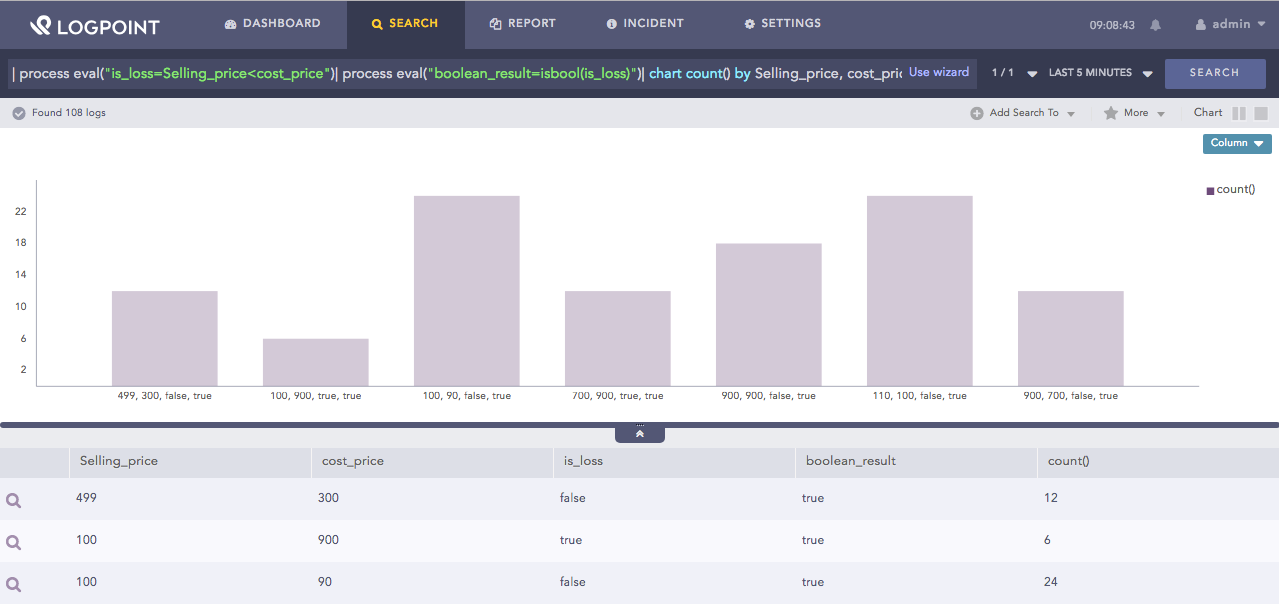
Here, the query first evaluates if the Selling_price is less than cost_price and returns its value in the is_loss identifier. Then, it returns true in the boolean_result identifier if the value in the is_loss field is Boolean. If the value is not a Boolean, the function returns false.
The chart count() command displays the count of the combination of Selling_price, cost_price, is_loss and boolean_result values as a chart and in a tabular form.
Accepts one argument X and returns true if the value of X is an integer. If the value is not an integer, the function returns false.
Syntax:
| process eval("identifier=isint(X)")
Example:
| process eval("isscore_int=isint(score)") | fields score, isscore_int
Using isint function
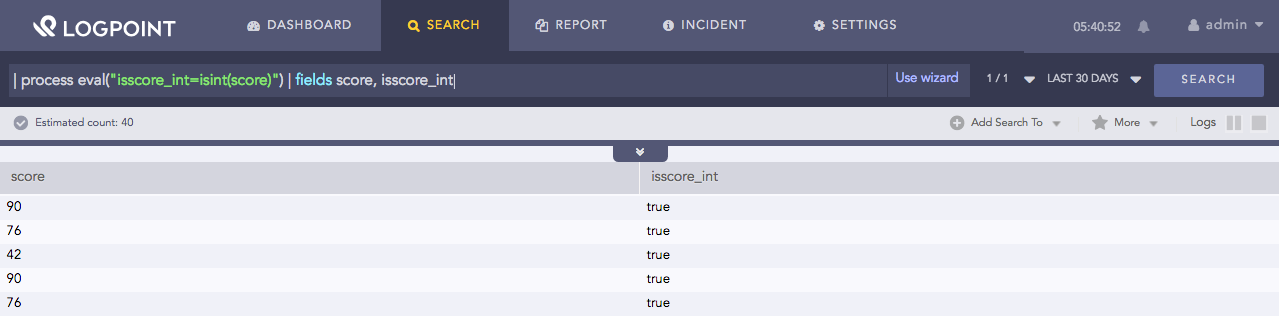
Here, the query returns true in the isscore_int identifier if the value in the score field is an integer. If the value is not an integer, the function returns false.
The fields command displays the value of score and isscore_int in a tabular form.
Accepts one argument X and returns true if the value of X is not null. If the value is null, the function returns false.
Syntax:
| process eval("identifier=isnotnull(X)")
Example:
| process eval("is_loss=Selling_price<cost_price")
| process eval("notnull_result=isnotnull(is_loss)")
| chart count() by Selling_price, cost_price, is_loss, notnull_result
Using isnotnull function
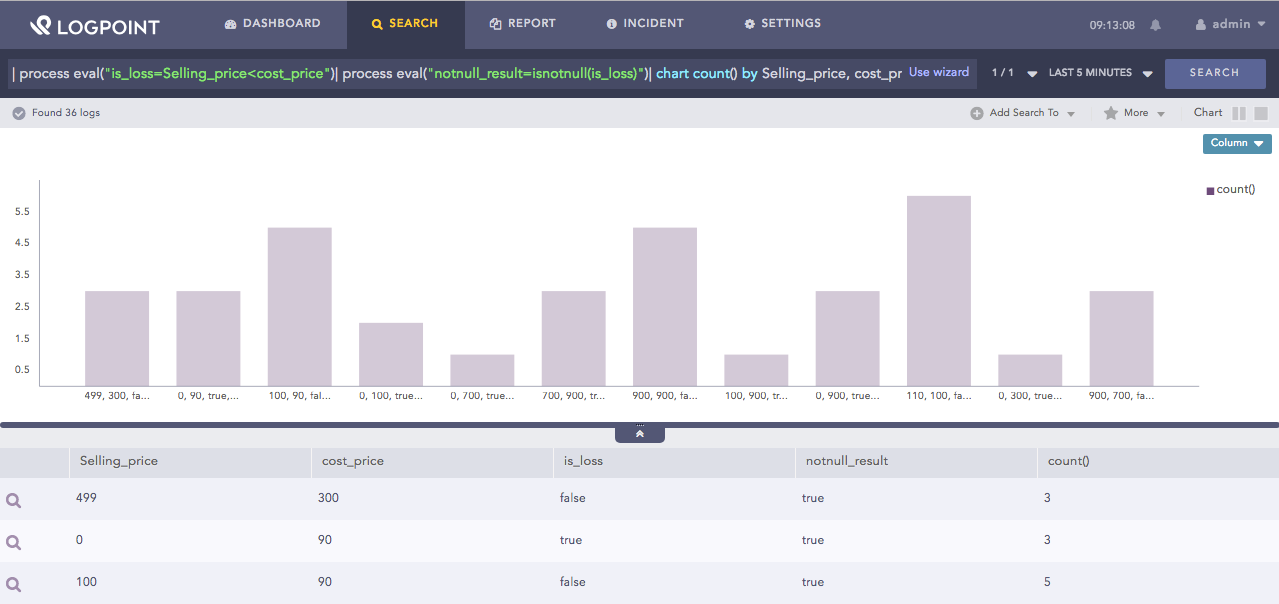
Here, the query first evaluates if the Selling_price is less than cost_price and returns its value in the is_loss identifier. Then, it returns true in the notnull_result identifier if the value in the is_loss field is not null. If the value is null, the function returns false.
The chart count() command displays the count of the combination of Selling_price, cost_price, is_loss and notnull_result values as a chart and in a tabular form.
Accepts one argument X and returns true if the value of X is null. If the value is not null, the function returns false.
Syntax:
| process eval("identifier=isnull(X)")
Example:
| process eval("is_loss=Selling_price<cost_price")
| process eval("null_result=isnull(is_loss)")
| chart count() by Selling_price, cost_price, is_loss, null_result
Using isnull function
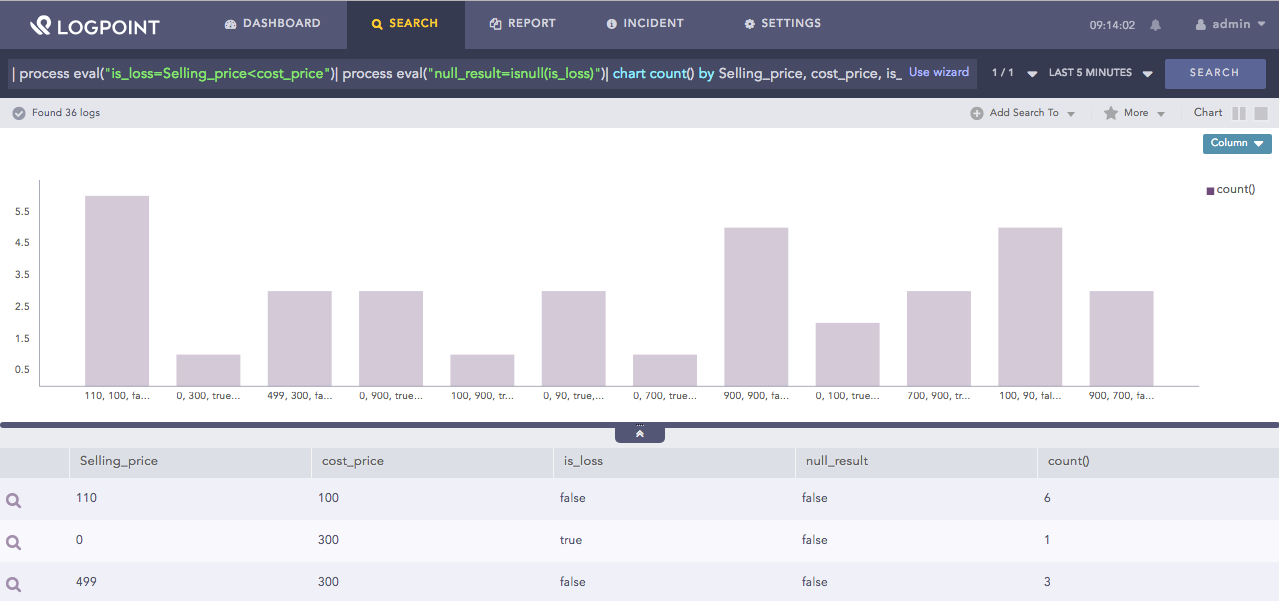
Here, the query first evaluates if the Selling_price is less than cost_price and returns its value in the is_loss identifier. Then, it returns true in the null_result identifier if the value in the is_loss field is null. If the value is not null, the function returns false.
The chart count() command displays the count of the combination of Selling_price, cost_price, is_loss and null_result values as a chart and in a tabular form.
Accepts one argument X and returns true if the value of X is a number. If the value is not a number, the function returns false.
Syntax:
| process eval("identifier=isnum(X)")
Example:
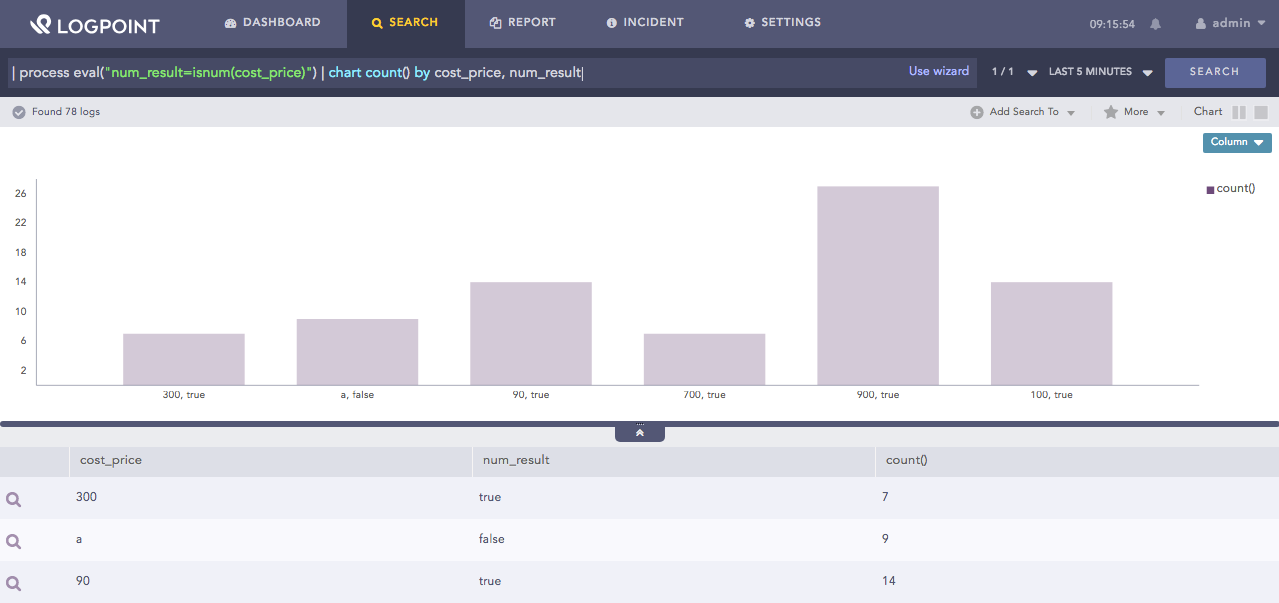
| process eval("num_result=isnum(cost_price)") | chart count() by cost_price, num_result
Using isnum function
Here, the query returns true in the num_result identifier if the value in the score field is a number. If the value is not a number, the function returns false.
The chart count() command displays the count of the combination of cost_price and num_result values as a chart and in a tabular form.
Accepts one argument X and returns true if the value of X is a string. If the value is not a string, the function returns false.
Syntax:
| process eval("identifier=isstr(X)")
Example:
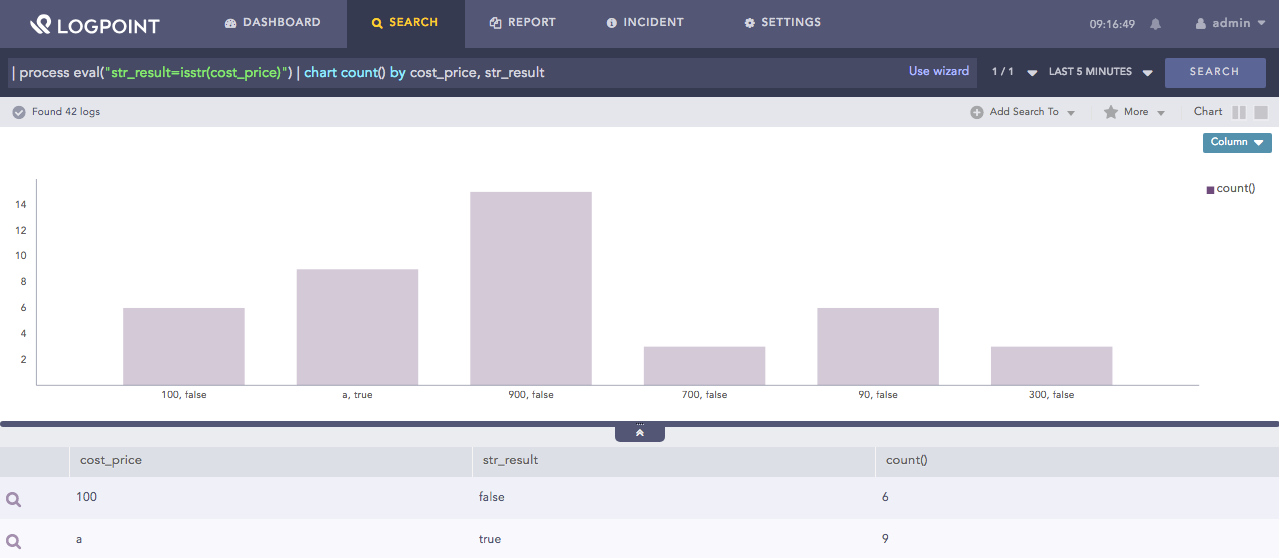
| process eval("str_result=isstr(cost_price)") | chart count() by cost_price, str_result
Using isstr function
Here, the query returns true in the str_result identifier if the value in the cost_price field is a string. If the value is not a string, the function returns false.
The chart count() command displays the count of the combination of cost_price and str_result values as a chart and in a tabular form.
Accepts one argument X and returns the field type of the value of X, such as integer, double, string and boolean.
Syntax:
| process eval("identifier=typeof(X)")
Example:
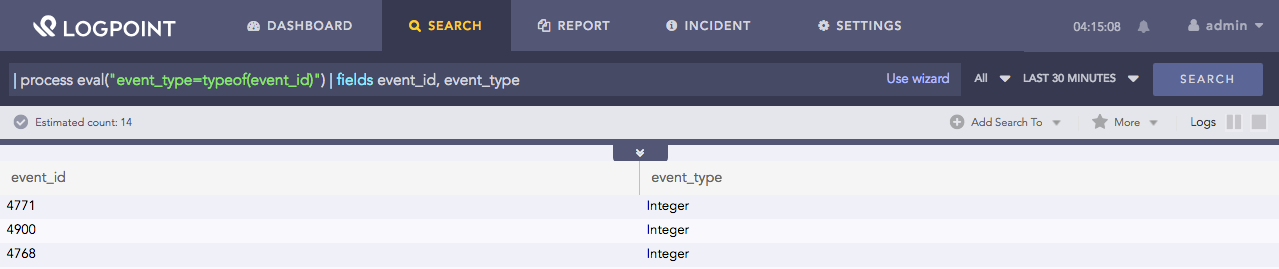
| process eval("event_type=typeof(event_id)") | fields event_id, event_type
Using typeof function
Here, the query returns the field type of the event_id value in the event_type identifier.
The fields command displays the value of event_id and event_type in a tabular form.
Accepts two arguments X and Y as input and returns true if X is a substring of Y. If X is not a substring, the function returns false.
Syntax:
| process eval("identifier=issubstr(X, Y)")
Example:
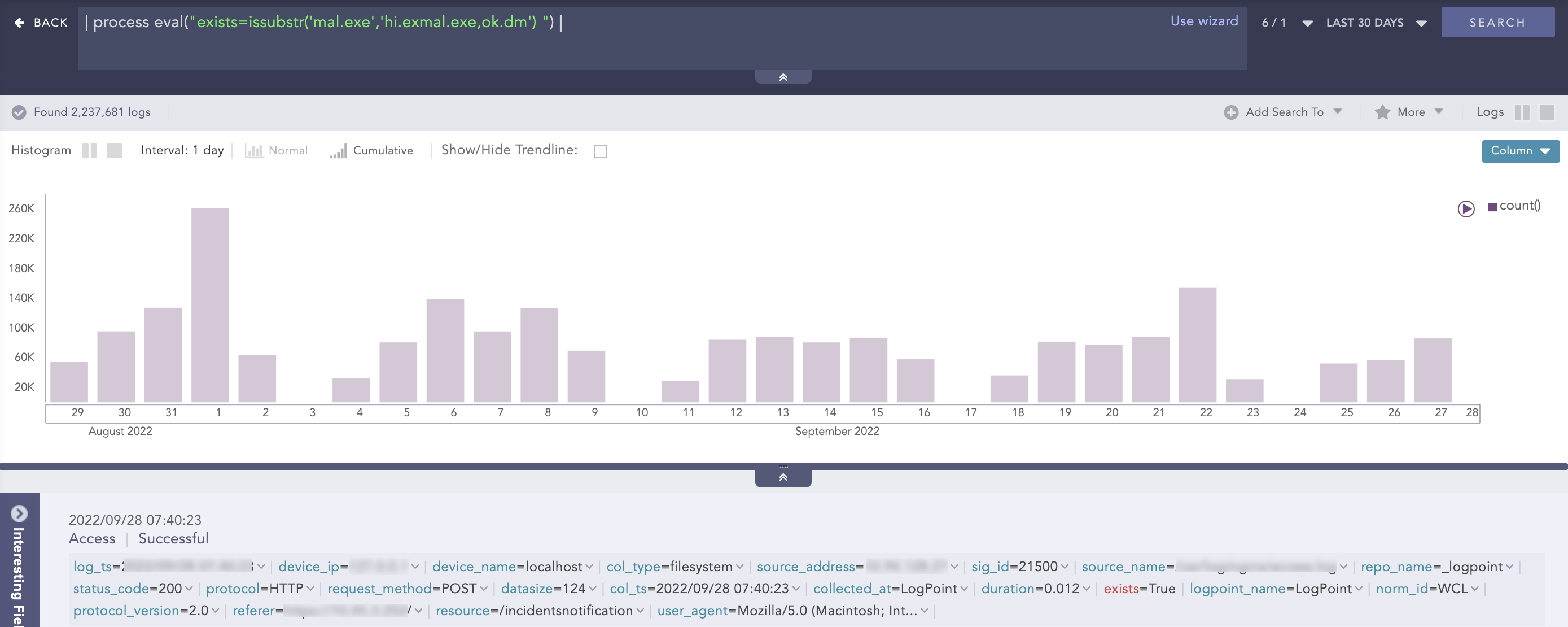
| process eval("exists=issubstr('mal.exe','hi.exmal.exe,ok.dm') ")
Using issubstr function
Here, the query returns true in the exists identifier if mal.exe is substring of hi.exmal.exe,ok.dm. If mal.exe is not a substring, the function returns false.